1
Home working
Access an approved office computer and continue using familiar programs, files and local applications.
WORK FROM ANYWHERE · HOME OFFICE · TRAVEL
Access your office or home computer securely while working from home, travelling for business, staying away or handling tasks on the go. Your apps, files and familiar work environment remain available without constantly moving sensitive data around.
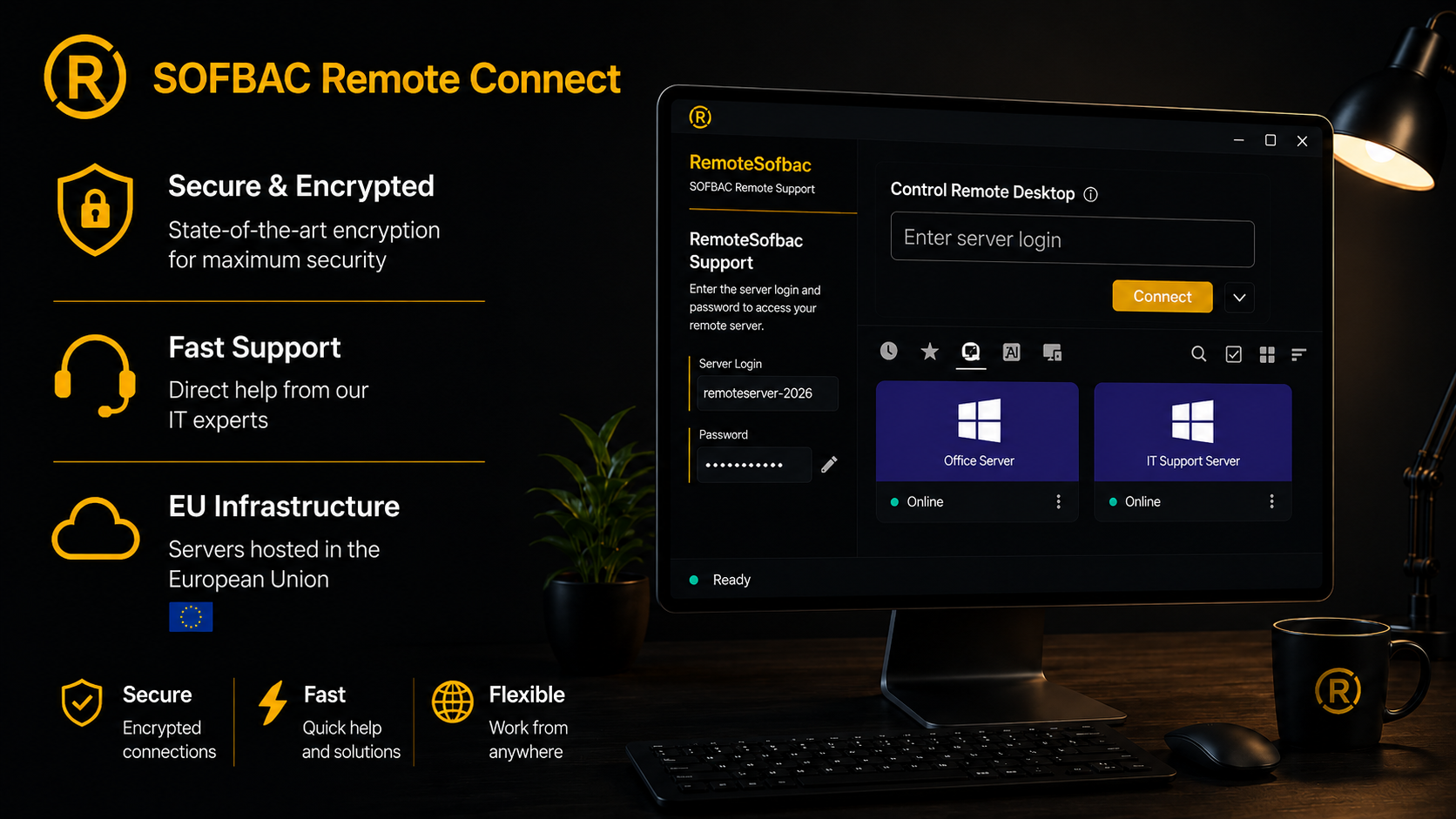
SOFBAC REMOTE CONNECT
Remote Connect is more than a link between two computers. The service is prepared for the way you actually work: one office PC, several employees, ongoing technical support or multiple locations.
Access an approved office computer and continue using familiar programs, files and local applications.
Reach important workstations from a laptop without exposing the entire internal company network.
Check Windows, application and workstation problems quickly – with user approval and clear responsibility.
Work in either direction when required: home to office or office to an enabled home computer.
REAL SITUATIONS, NOT ABSTRACT TECHNOLOGY
“I am working from home today and continue on my office computer.”
Checks a document, payment or local office application after hours.
Uses software installed only on a specific company workstation.
Provides quick help without travelling on site for every small issue.
HOW IT WORKS
Briefly describe the number of computers, users and working pattern.
Select a standard plan or request an individual proposal.
SOFBAC Remote Connect is prepared as a portable or installed solution.
Access follows the agreed credentials, permissions and support rules.
SECURITY & CONTROL
SOFBAC Remote Connect uses a self-hosted RustDesk server with its own ID and relay services. Clients are configured with the public key of this infrastructure. Direct connections are preferred; when this is not technically possible, traffic may pass through the dedicated relay server.
Devices register with infrastructure operated by SOFBAC rather than an arbitrary public default server.
When a direct connection is not possible, a dedicated relay service is available.
The client is configured with the public key of the self-hosted server.
The current Remote infrastructure runs on a Hetzner server in Germany.
Unattended access is enabled only after explicit agreement and suitable configuration.
A named contact understands the environment and manages setup and support.
PLANS
Stripe payment links will be added after the products are created. Until then, each order button opens the enquiry form.
1–3 computers
4–6 computers
7–20 computers
20–50 computers
For larger environments, multiple locations or fully separated infrastructure, we prepare an individual proposal after a technical review.
 Grzegorz Majerowicz
Personal technical support without an anonymous call centre.
PERSONALLY MANAGED
Planning, setup and coordination are handled directly by Majerowicz.com. The main focus is secure work from anywhere – from home, during business trips, while travelling or whenever you need access away from the office.
Technology, setup & direct contact
More than 30 years of experience in business IT, networks, servers, ERP systems and secure remote access.
Home office · travel · office ↔ home
Ideal when you want to work directly on your usual office computer from home, on the road or while staying away.
FREQUENTLY ASKED QUESTIONS
A traditional company VPN is not required for normal Remote Connect access. The exact setup depends on your environment.
Portable use is possible for support and testing. A controlled installation is normally recommended for regular home working or unattended access.
Only when it is powered on, connected to the Internet and configured appropriately. Sleep modes and local security settings can affect access.
A normal support session requires user approval. Permanent unattended access is enabled only after explicit agreement.
RustDesk can then route the session through the self-hosted relay server.
Yes. Multiple locations, separated servers and special security requirements are planned individually.

CONTACT
Your enquiry goes to support@sofbac.com. After review you will receive a concrete response – without an anonymous sales call.
SOFBAC Remote Connect
operated by Majerowicz.com
Dorfstraße 58
17309 Belling · Germany
We solve practical problems around everyday work, data security and business processes. Start with what you need today.
 NEW · PILOT
SOFBAC Invoice
Create and receive electronic invoices and process structured business documents in a clear and practical workflow.
Learn more →
NEW · PILOT
SOFBAC Invoice
Create and receive electronic invoices and process structured business documents in a clear and practical workflow.
Learn more →
 AVAILABLE
SOFBAC Workspace
Company files and documents remain available wherever you work. Teams collaborate without version chaos and unnecessary attachments.
Learn more →
AVAILABLE
SOFBAC Workspace
Company files and documents remain available wherever you work. Teams collaborate without version chaos and unnecessary attachments.
Learn more →
 AVAILABLE
SOFBAC Remote
Work from home or while travelling. Securely access your company computer and familiar working environment.
Learn more →
AVAILABLE
SOFBAC Lager
Know what is in stock and how goods move. Inventory, stock movements and reports are available in one system.
Learn more →
AVAILABLE
SOFBAC Remote
Work from home or while travelling. Securely access your company computer and familiar working environment.
Learn more →
AVAILABLE
SOFBAC Lager
Know what is in stock and how goods move. Inventory, stock movements and reports are available in one system.
Learn more →
 AVAILABLE
SOFBAC Care
Detect problems before they interrupt the business. Monitoring makes critical changes to computers and devices visible early.
Learn more →
AVAILABLE
SOFBAC Care
Detect problems before they interrupt the business. Monitoring makes critical changes to computers and devices visible early.
Learn more →
 AVAILABLE
SOFBAC Pass
Company passwords stay in a protected place. Access can be provided to the right people without sending passwords by email.
Learn more →
AVAILABLE
SOFBAC Pass
Company passwords stay in a protected place. Access can be provided to the right people without sending passwords by email.
Learn more →
 AVAILABLE
SOFBAC Image
Restore data, applications and settings after failure, damage or loss. Workstations do not have to be rebuilt from scratch.
Learn more →
AVAILABLE
SOFBAC Image
Restore data, applications and settings after failure, damage or loss. Workstations do not have to be rebuilt from scratch.
Learn more →
 AVAILABLE
SOFBAC Folder
Important folders are backed up automatically. A computer failure does not have to mean losing company documents.
Learn more →
AVAILABLE
SOFBAC Folder
Important folders are backed up automatically. A computer failure does not have to mean losing company documents.
Learn more →
 AVAILABLE
SOFBAC Mail
Protect Outlook data and PST archives. Messages and attachments remain available when your organisation needs them later.
Learn more →
AVAILABLE
SOFBAC Mail
Protect Outlook data and PST archives. Messages and attachments remain available when your organisation needs them later.
Learn more →
 AVAILABLE
SOFBAC Bild
Photos from field work and completed jobs are stored in an organised way. Customer, job and project documentation stays easy to find.
Learn more →
AVAILABLE
SOFBAC Bild
Photos from field work and completed jobs are stored in an organised way. Customer, job and project documentation stays easy to find.
Learn more →
 AVAILABLE
SOFBAC CCTV
Protect important camera events before recordings are overwritten. Relevant material remains available for claims, complaints and investigations.
Learn more →
CUSTOM
Your solution
Your requirement is not listed? Describe the problem. We will check whether SOFBAC should be extended or a custom solution developed.
Learn more →
AVAILABLE
SOFBAC CCTV
Protect important camera events before recordings are overwritten. Relevant material remains available for claims, complaints and investigations.
Learn more →
CUSTOM
Your solution
Your requirement is not listed? Describe the problem. We will check whether SOFBAC should be extended or a custom solution developed.
Learn more →